[typescript] 타입스크립트에서 MetaMask 연결 구현하기 (Web3.js)
web3.js / MetaMask / ABI / window.ethereum / 메타마스크 / 리액트 / React
React 기반이므로 보일러플레이트 ‘CRA’ 를 설치해준다
npx create-react-app "이름" —template typescript
web3을 설치해준다
npm install web3
window.ethereum 인터페이스 (react-app-env.d.ts)
/// <reference types="react-scripts" />

interface Window {
  ethereum: any;
}

// 👉 Window라는 객체에 메타마스크를 설치하면 ethereum: any 라는 오브젝트가 생긴다
// 👉 리액트에선 이걸 인식하지 못함
// 👉 그래서 이런식으로 강제로 적어주는것이다
web3.js 를 통해 스마트 컨트랙트 생성하기 (index.ts)
- 개발자는 ‘스마트 컨트랙트 주소’와 ‘ABI’를 알면 ‘web3.js’ 를 통해
- 스마트 컨트랙트를 생성하고 / 특정 함수를 실행할 수 있다
import { AbiItem } from "web3-utils";
import Web3 from "web3";

// remix IDE 에서 컴파일 밑에 ABI 를 복사해온다
const mintAnimalTokenAbi: AbiItem[] = [ABI 붙혀넣기];

const saleAnimalTokenAbi: AbiItem[] = [ABI 붙혀넣기];

// remix IDE 에서 메타마스크로 각각 배포하고 나온 컨트랙트 주소를 복사해온다
const mintAnimalTokenAddress = "0x9bADD7AB6c2d6929bf8483Db8aBD9D71EFd49E29";
const saleAnimalTokenAddress = "0x01F1A290D1954f770B4CeF170EBF1DeE474Ceb3F";

export const web3 = new Web3(window.ethereum);
// 메타마스크가 설치되어있으면 따로 import하지 않아도 작동하는 모듈 (window.ethereum)

export const mintAnimalTokenContract = new web3.eth.Contract(
  // ⭐ 개발자는 '스마트 컨트랙트 주소'와 'ABI'를 알면 'web3.js' 를 통해
  // ⭐ 스마트 컨트랙트를 생성하고 / 특정 함수를 실행할 수 있다
  mintAnimalTokenAbi,
  mintAnimalTokenAddress
);

export const saleAnimalTokenContract = new web3.eth.Contract(
  saleAnimalTokenAbi,
  saleAnimalTokenAddress
);
리액트와 메타마스크 지갑 연결 (App.tsx)
import React, { FC, useEffect, useState } from "react";
import { BrowserRouter, Routes, Route } from "react-router-dom";
import Main from "./routes/main";

const App: FC = () => {
  const [account, setAccount] = useState < string > "";

  const getAccount = async () => {
    try {
      // try 문 안의 코드가 쭉 실행되고 에러가 없다면 catch는 건너뛴다
      if (window.ethereum) {
        // if 👉 메타마스크가 설치되어있으면 실행된다
        const accounts = await window.ethereum.request({
          method: "eth_requestAccounts",
        }); // 연결된 메타마스크의 주소가 나온다
        // 👉 window.ethereum.request 을 console.log에 찍어보면 확인할수 있다

        setAccount(accounts[0]);
        // 연결된 메타마스크의 주소를 useState에 담는다
      } else {
        // 메타마스크가 설치되어있지 않다면 👉 alert 문구가 나온다
        alert("Install Metamask!");
      }
    } catch (error) {
      // 에러가 발생한다면 catch 실행
      console.error(error); // 👉 에러가 발생했다고 출력
    }
  };

  useEffect(() => {
    getAccount(); // getAccount 한번만 실행
  }, []);

  return (
    <BrowserRouter>
      <Routes>
        <Route path="/" element={<Main />} />
      </Routes>
    </BrowserRouter>
  );
};

export default App;
리액트와 메타마스크 지갑 연결 구현
npm run start 를 하면
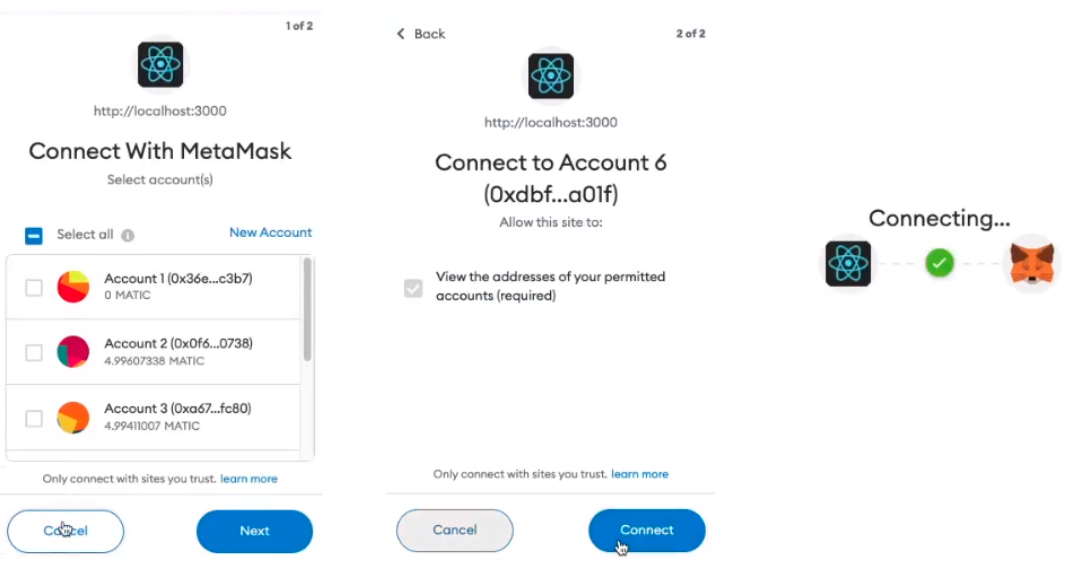
👆 메타마스크 지갑과 연결할 수 있는 팝업창이 나오고 연결할 수 있다
전체코드 github
https://github.com/wavescats/mini-project/tree/main/Dapp-NFT(MintAnimal)/front-end
참고 했던 사이트 🖥
-
https://blog.valist.io/how-to-connect-web3-js-to-metamask-in-2020-fee2b2edf58a
-
https://velog.io/@mjlee0326/React%EC%99%80-Web3%EC%9D%98-%EB%A7%8C%EB%82%A8